Why do we need architecture and design principles?
Since you joined this course, you already have at least some intuition, if not some experience, telling you that architecture and design patterns are fundamental to any software project.
However, I still think it is crucial to define, concretely, why software architecture is important, even if it risks being pedantic. This will enable you to:
- Decide when and how to apply the principles you learn.
- Discuss issues with other developers.
Many developers focus on code that is easy and quick to write.
However, you should instead focus on code that is easy to read, because code is written once but read many times.
“Indeed, the ratio of time spent reading versus writing is well over 10 to 1. We are constantly reading old code as part of the effort to write new code. [Therefore,] making it easy to read makes it easier to write.”
― Robert C. Martin, Clean Code: A Handbook of Agile Software Craftsmanship
You cannot rely on the fact that you know how some code works just because you wrote it. You will forget it. Therefore, you must make it easy for you and other developers to quickly understand what a piece of code does.
Hence:
“Programs must be written for people to read, and only incidentally for machines to execute.”
― Harold Abelson, Structure and Interpretation of Computer Programs
Some developers take great pride in writing dense, cryptic code, thinking it shows how smart they are. However, during maintenance, such code is not an asset, but a liability.
You won’t impress anyone with clever code. Other developers will hate you because clever code takes so much time and effort to read and understand. When you forget what a convoluted piece of code does, you will hate it too.
“Everyone knows that debugging is twice as hard as writing a program in the first place. So if you are as clever as you can be when you write it, how will you ever debug it?”
— Brian Kernighan, The Elements of Programming Style
Metrics and heuristics to find code with structural issues
Readability is hard to define, as it can mean different things to different people at different times.
A piece of code you just wrote might seem pretty readable while you still remember exactly what each line does. However, that will change in six months, when that memory disappears.
Conversely, you might look at some code and get the impression it looks off even if you can’t articulate why.
We need something more concrete than mere impressions. In software jargon, we need to identify code smells, i.e., signs that some code might have a problem.
There are several code smells. As you gain experience and knowledge of software design principles and best practices, you will learn to recognize more and more.
But we need to start somewhere. Here are a couple of code smells to start identifying in your project.
- Long methods;
- Deep nesting.
We do not need a perfect definition of the words “long” and “deep,” as they depend on context. The same piece of code can vary in length and nesting level depending on your code style.
// One line of code, no indentation.
ListRow(header: category.name, caption: "\(category.transactions.count) transactions", systemImage: category.systemImage)

// The same code can be five-lines long and have one level of nesting.
ListRow(
	header: category.name,
	caption: "\(category.transactions.count) transactions",
	systemImage: category.systemImage
)
Aim for:
- 10-20 lines of code and 3-5 nesting levels if you prefer a compact style;
- 20-40 lines and 5-7 nesting levels if you format your code to fit a specific column width.
Keep in mind that these are mere heuristics, i.e., pragmatic methods that are not fully optimized, perfected, or rationalized, but are nevertheless “good enough” as an approximation.
The numbers aren’t really important, so pick some that make sense to you and move on. As you learn more about software design principles, you will develop a better sense for code smells, and you won’t look at these numbers anymore.
Do this: Identify the first code smells in your codebase
Look into your project and identify methods with too many lines and deep nesting.
You do not have to count. Double-click on the opening or closing braces of a block of code to select it, and Xcode will display the line count in the bottom-right corner of the editor.
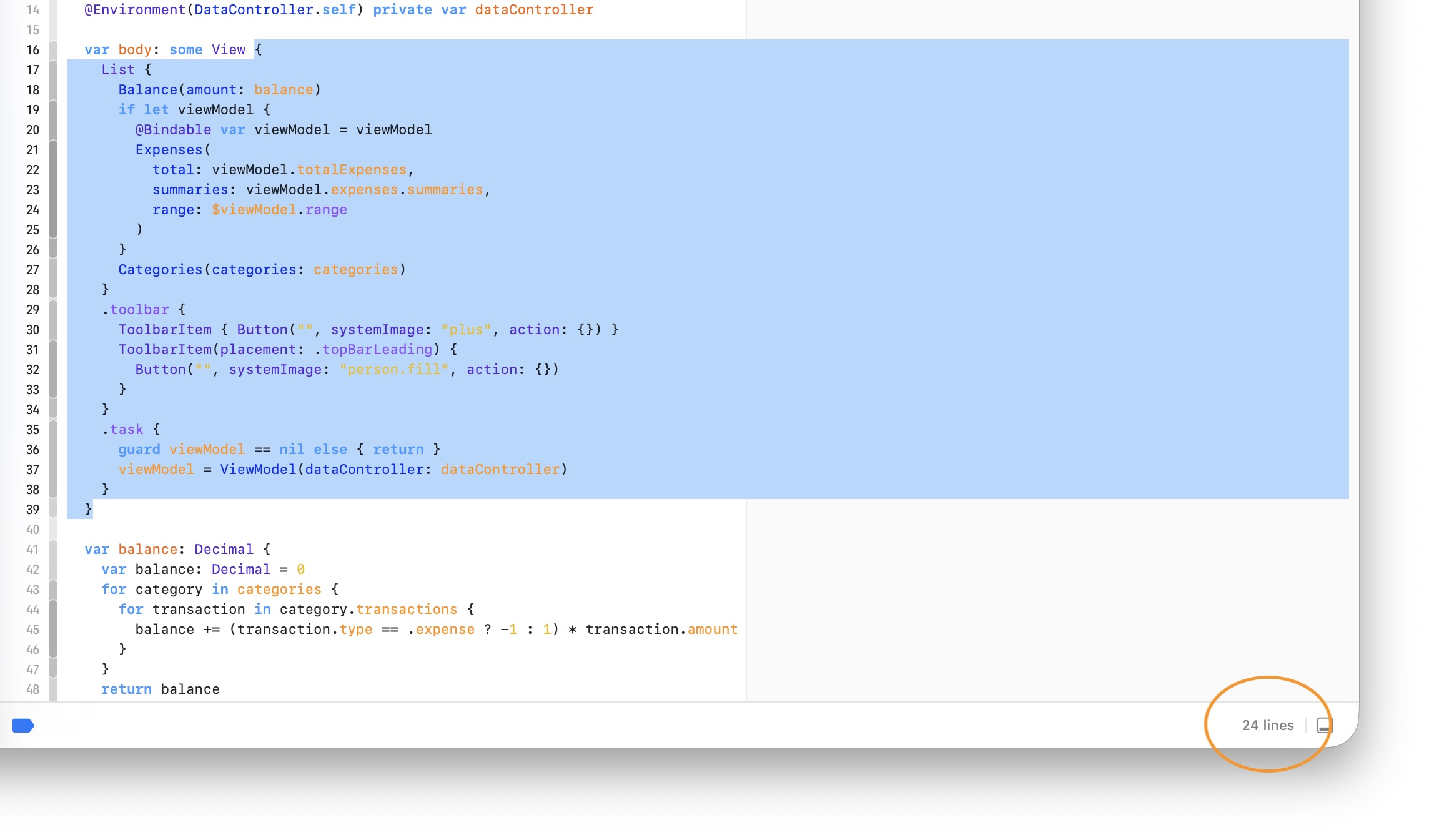
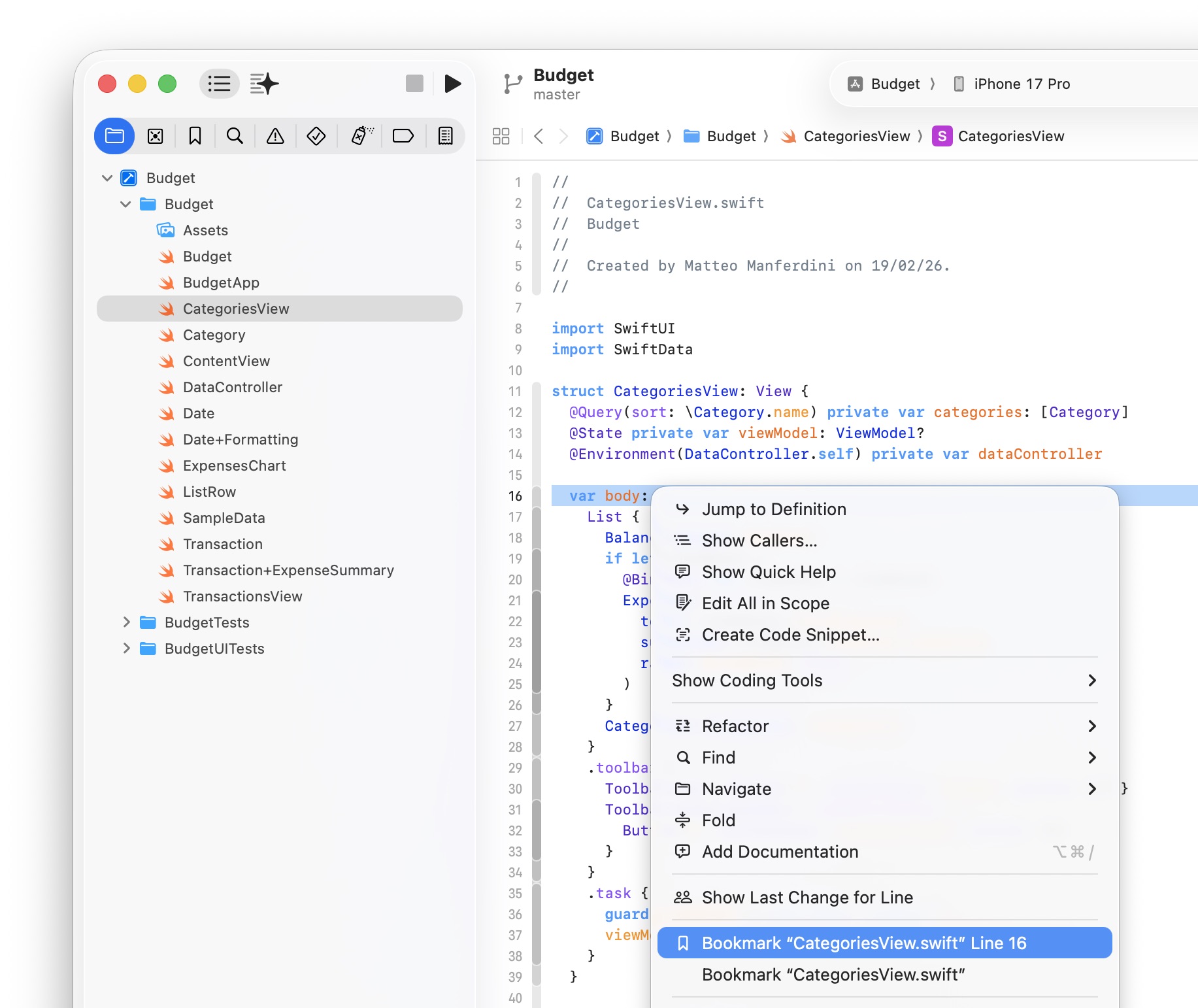
You will come back to fix these methods as you go through this course. To find them later, you can bookmark a line of code directly in the Xcode editor using its contextual menu.
SwiftUI views are the most obvious candidates for long methods, since that’s where most code tends to cluster, especially in new codebases. However, do not ignore other types, if you have some in your project, i.e., classes, structures, and enumerations.
Once you identify code exhibiting structural problems, refactor it to improve readability and maintainability without changing its external behavior or functionality.
However, I didn’t show you how to do that yet. We need design principles to guide refactoring, which we will cover in the next lesson.
I never noticed the bookmark option in the context menu before!