Badly architected code easily breaks whenever you change seemingly unrelated code
Writing understandable code is only part of what makes a codebase maintainable.
Another desirable property of well-architected code is that it is as easy as possible to make changes, whether to add new features, change existing ones, or fix bugs.
You might already have encountered this problem. You want to add a feature to your app that, at first, appears straightforward. However, when you change your code, even minimally, many other parts break, and your Xcode project fills with compiler errors.
Often, fixing all those errors is not trivial. In any case, it is time-consuming, since you now have to work on the code you didn’t plan to update. This, in turn, can cause even more breaking changes in a chain that seems unstoppable.
And even after fixing all the errors the compiler errors, there is no guarantee you didn’t introduce any new bugs. You now need to test your app extensively and fix anything you broke.
That’s all time you are not spending on the new feature you thought you could add in a couple of days. This is how the technical debt you build in your codebase by taking shortcuts comes back to bite you later.
The two-week sprint that took two months to finish
At my first job as an iOS developer, we planned a two-week sprint to add a simple form to the app.
Implementing the feature was quite straightforward, but the QA testers found some bugs in the app. When we fixed those, the testers would find new ones.
A sprint that was supposed to take 2 weeks took 2 months instead. In the end, we decided to ship the app with unfixed bugs, or it would have taken even longer.
The reason was that when that company started, the app was developed by contractors who took many shortcuts. We inherited a codebase with significant technical debt that hindered new development.
The only way to fix the architectural problems was a complete rewrite (or so we thought), which management rejected because it would have taken months, thereby blocking the release of new features.
Keep your modules decoupled to reduce interdependence and breaking when you change some other code
The degree of interdependence between software modules is called coupling. The more closely connected the modules are, the more they are likely to break when you change one of them.
There are several principles to reduce coupling between modules in your app. The most straightforward is the Law of Demeter, also known as the Principle of Least Knowledge.
The Law of Demeter
A module should have only limited knowledge about other modules and only of those closely related.
The fundamental notion is that a given type should assume as little as possible about the structure or properties of other types.
Coupling can take many forms. Inside a single module, e.g., a SwiftUI view, it can be caused by code with too many concerns, as we saw in the previous lesson.
Coupling between modules can also have many causes. A common one is types being used indiscriminately across your codebase, even where they are not necessary.
This shows up as a code smell called shotgun surgery, i.e., a modification that requires making many small changes across many different types.
Do this: Remove unnecessary dependencies between modular views and other types
SwiftUI views are again the primary place to start applying the Law of Demeter. Views are often coupled to types they should know nothing about.
When creating modular views, it is common to pass whole data types to a view, which then accesses their internal state to display information on the screen.
struct CategoryRow: View {
	let category: Category

	var body: some View {
		LabeledContent {
			Group {
				Text(balance, format: .currency(code: "USD"))
					.font(.headline)
					.foregroundStyle(.primary)
			}
			.frame(maxWidth: .infinity, alignment: .trailing)
		} label: {
			Label {
				Group {
					Text(category.name)
						.bold()
						.fixedSize()
					Text("\(category.transactions.count) transactions")
				}
				.padding(.leading, 8)
			} icon: {
				Image(systemName: category.systemImage)
					.imageScale(.medium)
					.symbolVariant(.fill)
					.background {
						Circle()
							.foregroundStyle(.gray.quinary)
							.frame(width: 40, height: 40)
					}
			}
		}
		.padding(.horizontal, 12)
	}

	var balance: Decimal {
		var balance: Decimal = 0
		for transaction in category.transactions {
			balance += (transaction.type == .expense ? -1 : 1) * transaction.amount
		}
		return balance
	}
}

#Preview {
	List {
		CategoryRow(category: .fitness)
	}
}
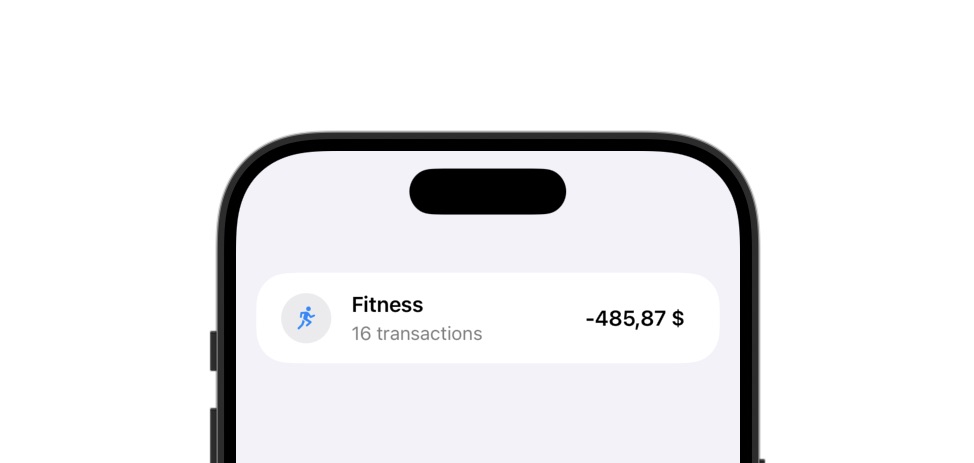
The CategoryRow accesses the internal properties of the Category and Transaction classes, a code smell known as inappropriate intimacy.
Any breaking change to these types. e.g., removing some of their stored properties or changing their types, is bound to break the view’s code as well.
Moreover, calculating a category’s balance and retrieving the remaining information also violates the Separation of Concerns principle.
The CategoryRow view should only display data, so it should receive it as simple Swift types.
struct ListRow: View {
	let header: String
	let caption: String
	let systemImage: String
	var amount: Decimal?
	var date: Date?

	var body: some View {
		LabeledContent {
			Group {
				if let amount {
					Text(amount, format: .currency(code: "USD"))
						.font(.headline)
						.foregroundStyle(.primary)
				}
				if let date {
					Text(date, format: Date.FormatStyle(date: .abbreviated))
						.font(.subheadline)
				}
			}
			.frame(maxWidth: .infinity, alignment: .trailing)
		} label: {
			Label {
				Group {
					Text(header)
						.bold()
						.fixedSize()
					Text(caption)
				}
				.padding(.leading, 8)
			} icon: {
				Image(systemName: systemImage)
					.imageScale(.medium)
					.symbolVariant(.fill)
					.background {
						Circle()
							.foregroundStyle(.gray.quinary)
							.frame(width: 40, height: 40)
					}
			}
		}
		.padding(.horizontal, 12)
	}
}
Decoupling the ListRow view from other types makes it also reusable, enabling us to display rows of categories as well as transactions.
#Preview {
	List {
			ListRow(
				header: "Sport shoes",
				caption: "Fitness",
				systemImage: "figure.run",
				amount: -12345,
				date: Date.today
			)
		Section {
			ListRow(
				header: "Fitness",
				caption: "12 transactions so far",
				systemImage: "figure.run"
			)
		}
	}
}
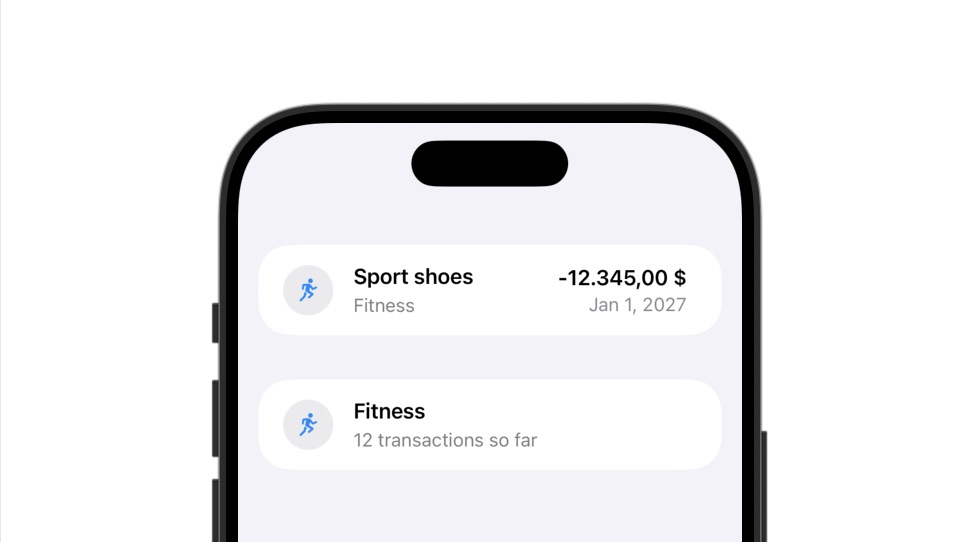
Notice that the balance computed property needs to be moved somewhere else. The most obvious candidate, at the moment, is the parent of the ListRow view.
That’s still better than before. While coupling remains in some views, most of your views will become decoupled, reusable, and resistant to breaking changes.
In the next lesson, we will find a better place for the balance calculation logic.